speedketchup
SpeedKetchup
Run periodic internet speed test, store, display results with builtin web server.
Introduction
This aims to be small, efficient all-in-one program (statically linked, includes web assets) written in rust. The intent is to allow monitoring of your internet connection as easy as possible. You can use speedketchup for one-off test or keep it running continuously to spot any changes in your internet connection.
Prebuilt executables for some platforms: | platform | executable | upx-compressed executable | |-|-|-| |linux x86_64|452k|197k| |linux i686|451k|202k| |linux aarch64|460k|189k| |linux arm|451k|196k| |linux mips|592k|224k| |linux mipsel|592k|227k| |windows x86_64|431k|182k| |macos universal (x86_64 + aarch64)|682k|
Builtin web server
Features
- automatic speedtest server selection based on latency or run against specific speedtest server
- uses HTTP protocol for all operations on network, skips speedtest servers that only serve over HTTPS
- tiny list of rust dependencies: std, libc, roxmltree + xmlparser
- results are stored in human readable .csv, other storage backends incoming
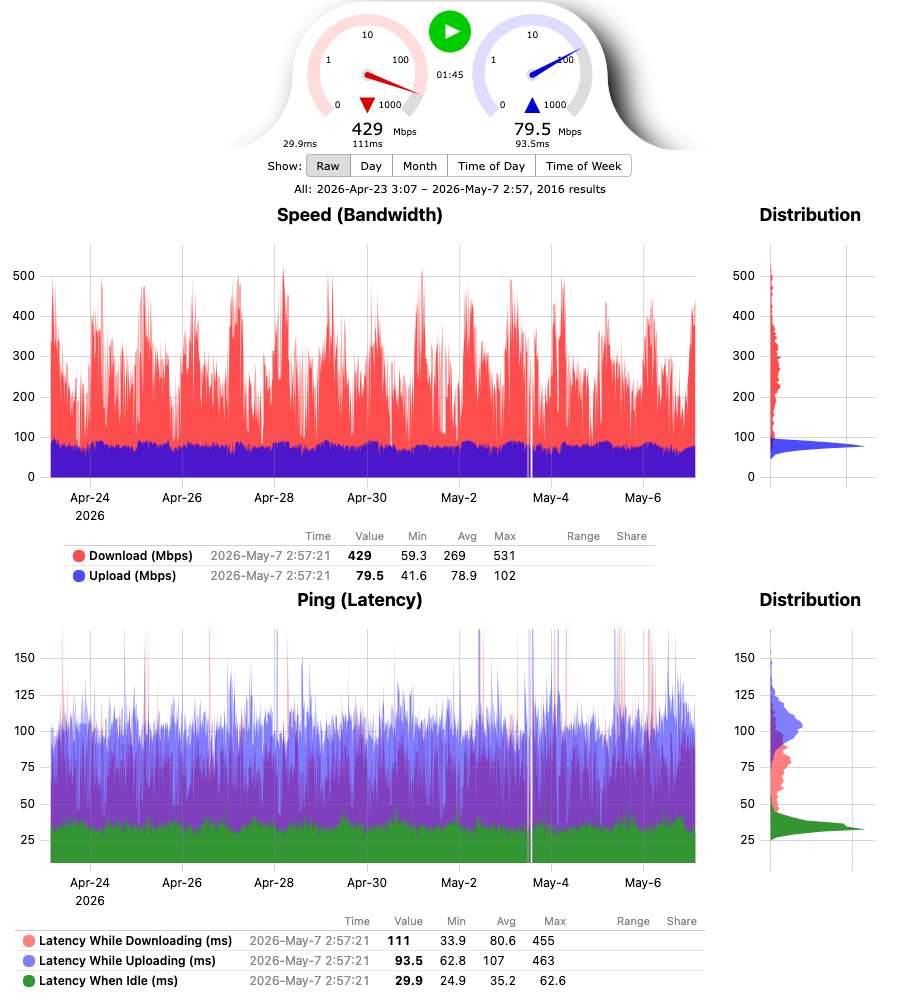
- builtin web-server to display results with uPlot charts:
- speed and latency charts, each with a distribution chart of the displayed results next to it
- every result, or daily, monthly, time of day or time of week averages
- legend with min/avg/max of the displayed results and the share of results in the hovered value range
- sortable table of the results with every recorded detail, including errors
- updates in place when a test finishes, keeping the zoom and the picked view
- all web assets are included in the program binary
- linux version statically linked with musl - not dependent on system libc, essentially a single binary container
- acts as a speedtest server itself. Not registered with official speedtest.net, but can be passed as speedtest server to supporting clients
Command Line
usage: speedketchup [options] -h|--help: print this -v|--version: print version -i|--interval <minutes>: test interval in minutes, 10 by default -f|--file <filename>: file to store test results in, speedketchup-results.csv by default -a|--address <local_addr>: address to listen on for incoming connections, 127.0.0.1 by default local_addr: use 0.0.0.0 to accept connections on all addresses -p|--port <port>: port to listen on for incoming connections, 8080 by default -s|--server <server_host[:server_port]>: speedtest server to use, avoids automatic server selection if specified server_host: domain_name|ipv4_addr|ipv6_addr server_port: port number, 8080 by default -dd|--download-duration <seconds>: how long to test download speed, 0 disables test, 10 seconds by default -ud|--upload-duration <seconds>: how long to test upload speed, 0 disables test, 10 seconds by default -dc|--download-connections <number>: how many parallel connections to make for download, 8 connections by default -uc|--uplaod-connections <number>: how many parallel connections to make for upload, 8 connections by default every option can also be given as an environment variable, command line options take precedence: SPEEDKETCHUP_INTERVAL, SPEEDKETCHUP_FILE, SPEEDKETCHUP_ADDRESS, SPEEDKETCHUP_PORT, SPEEDKETCHUP_SERVER, SPEEDKETCHUP_DOWNLOAD_DURATION, SPEEDKETCHUP_UPLOAD_DURATION, SPEEDKETCHUP_DOWNLOAD_CONNECTIONS, SPEEDKETCHUP_UPLOAD_CONNECTIONS
Building
A plain make gives you a binary for the machine you are on.
The release binaries are smaller than that: they are built on a pinned rust
nightly with -Z build-std, -Zlocation-detail=none and
-Cpanic=immediate-abort, which rebuilds the standard library without the
panic formatting machinery.
make release   # every released binary, needs a mac
make macos     # just the macos universal binary
make linux     # just the linux + windows binaries
The linux and windows binaries are cross built inside the container image in
build/Dockerfile - make linux builds that image and re-enters make inside
it, so the only thing needed on the host is container
on macos, or CONTAINER=docker (or podman) anywhere else. The image carries the
cross toolchains, a musl built for the tier 3 mips targets, upx and qemu-user -
every binary is run once before the build is considered done. Everything lands
in ./bin.
Container
Official container image: gatispei/speedketchup on Docker Hub.
The image is FROM scratch: one layer holding the statically linked binary and
an empty /data for the results volume, nothing else. No shell, no libc, no
base image underneath. Built for linux/amd64, linux/386, linux/arm64 and
linux/arm/v6.
make image
That cross builds the binaries and assembles the manifest with the same
container runtime as the rest of the build. With docker, point it at buildx:
make image IMAGE_BUILD="docker buildx build".
docker volume create speedketchup
docker run -p 8080:8080 -v speedketchup:/data gatispei/speedketchup
Alternatives
- https://www.speedtest.net/apps/cli - official speedtest cli tool, binary only
- https://github.com/sivel/speedtest-cli - speedtest cli tool in python
- https://github.com/nelsonjchen/speedtest-rs - speedtest cli tool in rust
- https://github.com/YuLinLee/speedtest - speedtest cli tool in c
- https://github.com/barrycarey/Speedmon - periodic speed test runner in python with various storage backends